Separating vocals from a song used to require complex studio tools and imperfect tricks. Today, an acapella extractor powered by AI stem splitting makes it possible to extract clean acapella vocals, drums, bass, and other instruments in minutes.
Whether you want to create a remix, build a bootleg, make a karaoke version, or study a mix, AI acapella extraction tools simplify the process dramatically.
One of the most complete online solutions for this is LALAL.AI, combining stem splitting, voice cleaning, reverb removal, and voice transformation tools in one platform.
What Is an Acapella Extractor?
An acapella extractor isolates the vocal performance from a fully mixed track, producing an acapella stem you can use for edits, remixes, DJ sets, and practice.
This process is often called:
- Acapella extraction
- Acapella maker
- Vocal removal
- Vocal isolation
- Stem extraction
- AI stem splitting
Modern AI models analyze frequency content and sound patterns to split a song into individual components such as:
- Vocals (acapella)
- Drums
- Bass
- Guitar
- Piano
- Synth
- Lead and backing vocals
Instead of manually cutting frequencies, AI identifies the sources directly.
Behind the Technology: Next-Generation AI Audio Models
Modern stem separation is powered by large-scale AI models trained on millions of audio samples. The latest generation engines focus on higher accuracy, faster processing, and improved source recognition across complex mixes.
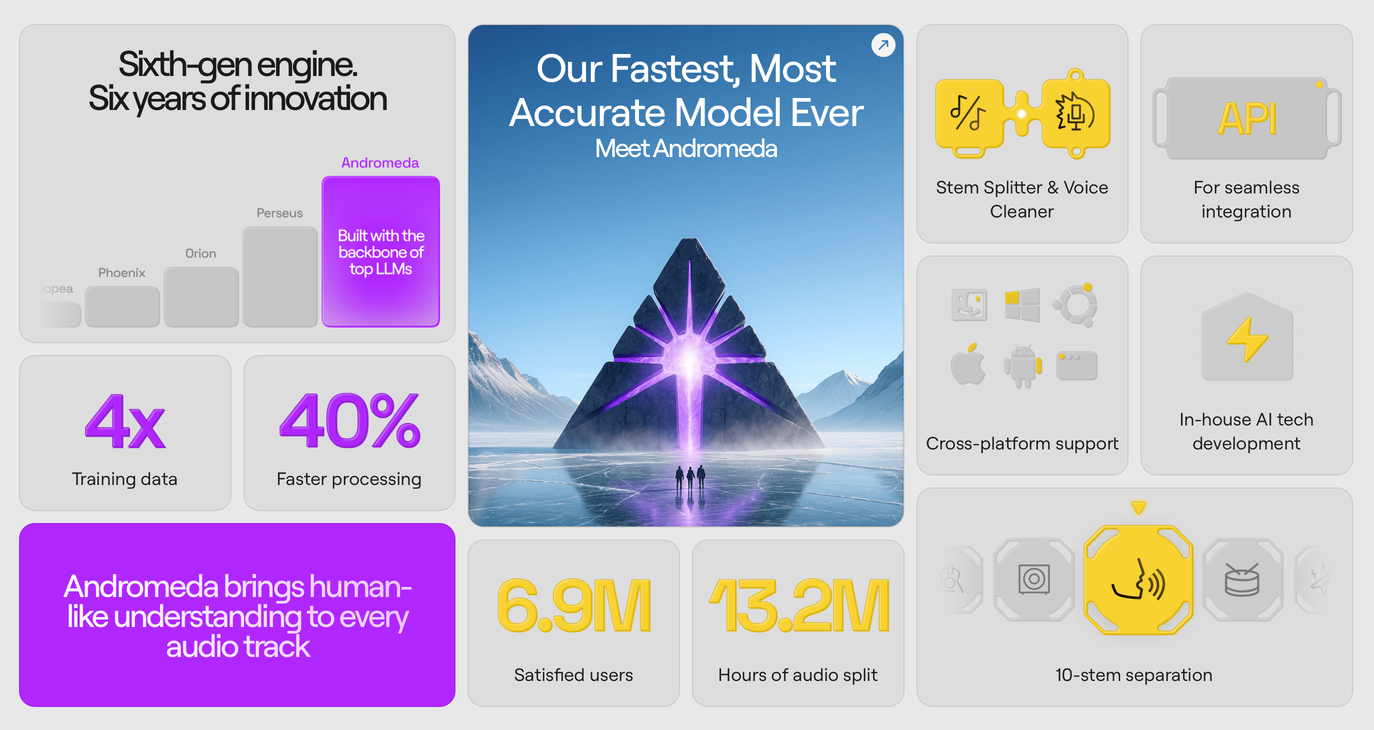
Image source: LALAL.AI.
Recent advancements highlight:
- Sixth-generation AI audio models
- Increased training data for better instrument recognition
- Faster processing speeds
- Multi-stem separation capabilities
- Cross-platform and API integration options
Step-by-Step: How to Use an Acapella Extractor on Any Song
Here is a simple workflow using LALAL.AI.
Step 1
Upload your song file to the Stem Splitter.
For best results, use a WAV or a 320 kbps MP3 file.
Step 2
Choose Vocal and Instrumental.
The AI processes the track and creates separate files for acapella vocals and the instrumental.
Step 3
Download the stems:
- Isolated acapella vocal track
- Instrumental version
- Optional individual stems like drums or bass
All processing works online without installation. Upload a file, choose the process, download the result.
Improve the Extracted Acapella Vocal
After acapella extraction, you may want to polish the result.
Echo and Reverb Remover
- Fix overly reverbed recordings
- Recover a drier vocal tone
- Rescue live takes
These tools help refine the acapella before you rebuild the production.
Go Further Than Simple Acapella Extraction
AI tools allow more advanced editing.
Lead and Back Vocal Remover
- Isolate lead vocals
- Separate harmonies
- Create clean instrumental or vocal layers for creative edits
Voice Cleaner
- Remove background noise
- Reduce unwanted sounds
- Improve clarity for remixes, podcasts, or voiceovers
Voice Changer
- Transform vocals into different styles
- Experiment with tone and character
- Create unique vocal textures
Voice Cloner
- Train a custom AI voice model
- Generate new vocal lines in your own voice
- Build branded or signature sounds
This goes beyond an acapella extractor and into full creative transformation.
Creating a Remix or Bootleg
Here is how a producer might use the full ecosystem.
Step 1
Extract acapella vocals, drums, and bass using the Stem Splitter.
Step 2
Clean the acapella using Voice Cleaner. Remove echo if needed with the Reverb Remover.
Step 3
Keep the original vocal. Replace drums and bass with your own production. Build new chords, melodies, and drops.
Step 4
Finish arranging and mixing inside your DAW.
Now you have a completely new version built from separated elements.
Example
Real Example: Extracting Acapella Vocals from a Finished Song
To see how AI acapella extraction performs in practice, here is a real-world style example.
This track contains drums, bass line, layered synths, lots of noises and heavy vocal reverb, which makes clean extraction more challenging than minimal productions.
Original Full Mix
Instrumental After Stem Splitting
Isolated Acapella Vocals
The vocal is clearly separated without any leaking, even with strong effects and overlapping instrumentation in the original mix.
After Applying Echo and Reverb Remover
The vocal becomes noticeably drier and more focused. Some minor artifacts may remain in very effect-heavy passages, but the overall clarity improves significantly.
This example shows that even complex, heavily processed tracks can be separated effectively, especially when using high-quality source files.
Who Uses AI Audio Processing Tools?
LALAL.AI works for multiple disciplines:
- Music producers – Make remixes or bootlegs
- DJs – Get vocal stems for DJ sets
- Audio engineers – Clean background noise from recordings
- Cover artists – Remove instruments to play them yourself
- Writers – Generate audiobook narration with voice cloning
- Bands – Clean up live recordings
- Podcasters – Improve vocal clarity
- Mixing or Mastering Engineer - Study mixes and indidual stems
- Sound designers – Isolate specific sounds for resampling
- Session musicians - Remove stems or even backing vocals
The same AI workflow supports many creative goals.
Audio Quality and Limitations
AI stem splitting is powerful, but not perfect.
- Higher quality source files produce better results
- Dense mixes may create minor artifacts
- Heavy distortion can reduce separation accuracy
- WAV files usually perform better than compressed audio
Understanding these limits helps set realistic expectations. AI stem splitting is advancing rapidly and has already reached a level that opens entirely new creative possibilities for the music industry.
Pricing
You can try LALAL.AI for free with 10 minutes of processing.
They offer:
- Subscription plans
- One-time payment options
- API access for automated stem splitting workflows
FAQ
What is the best acapella extractor?
AI stem splitters that separate vocals and instrumentals cleanly are typically the best option. LALAL.AI is one popular online choice because it also includes vocal cleanup tools like reverb removal and noise reduction.
Can I extract acapella vocals from a song for free?
Yes, limited free processing is available.
Can I extract drums or bass only?
Yes, stem splitting supports multiple instruments.
Does AI reduce audio quality?
Minor artifacts are possible, but modern models produce very clean results, especially with high-quality files.
Is it legal to use an acapella extractor on songs?
For private use and practice, generally yes. Commercial releases typically require permission from the rights holder.